What Is a Phishing Scam? Spotting and Stopping Scams
A phishing scam is a con trick delivered through your phone or inbox: a criminal pretends to be your bank, a delivery company, or even your boss, and talks you into sending money or handing over passwords and card numbers. It works through urgency and trust, not hacking skills, which is why anyone can be targeted.
At CPN Tech, we explain tech simply. This guide looks at phishing scams the way a scammer does: how the con is set up, the scripts criminals reuse, the red flags hiding in real scam messages, what to do in the first hour if you fall for one, and where to report it.
Key Takeaways
- A phishing scam is social engineering: a scripted confidence trick that impersonates someone you trust to steal money, passwords, or identity details.
- Every scam follows the same arc: the setup (targeting), the hook (urgency and fake credibility), and the payoff (money or stolen data).
- Common scripts include fake invoice scams, refund scams, job offer scams, tech support scams, and romance or crypto scams.
- Red flags hide inside the message itself: spoofed senders, payment pressure, and requests for gift cards, wire transfers, or crypto.
- If you fall for one, act in the first hour: call your bank, change passwords starting with email, freeze your credit, and report the scam.
- What Is a Phishing Scam, Exactly?
- How Does a Phishing Scam Unfold? The Setup, the Hook, and the Payoff
- What Are the Most Common Phishing Scam Scripts?
- How Can You Tell If a Message Is a Phishing Scam?
- How Can You Avoid Phishing Scams?
- What Should You Do If You Fell for a Phishing Scam?
- How Do You Report a Phishing Scam?
- Frequently Asked Questions
What Is a Phishing Scam, Exactly?
A phishing scam is a type of online fraud where a criminal impersonates a trusted person or organization to trick you into handing over money, passwords, financial details, or other sensitive information. The criminal rarely hacks anything: the whole attack runs on persuasion, fake credibility, and a message that arrives at the wrong moment. It is the digital version of the classic confidence trick. The term dates to the mid-1990s, when scammers on early internet services borrowed the spelling from “phreaking,” a word for hacking phone systems (see the term’s history on Wikipedia).
Phishing scams operate at industrial scale: the Anti-Phishing Working Group reported more than one million phishing attacks in a single quarter of 2025, and the FBI’s Internet Crime Complaint Center receives well over 100,000 phishing complaints in a single year. One campaign can reach millions of inboxes, so criminals need only a tiny fraction of people to bite.
For the full definition, see our guide to what phishing is. This article focuses on the scam itself: the scripts, the psychology, and the recovery steps.
How Does a Phishing Scam Unfold? The Setup, the Hook, and the Payoff
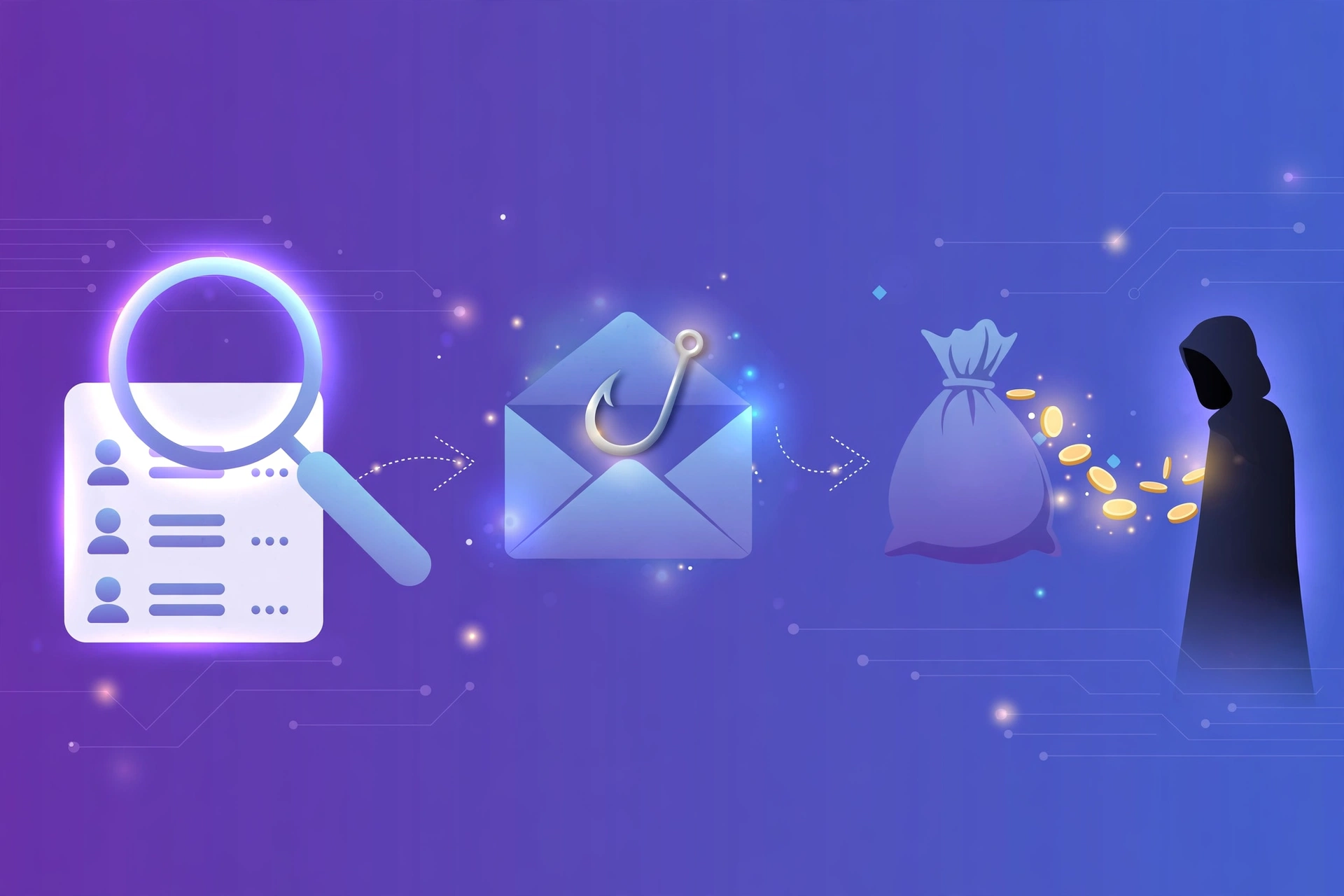
Think of a phishing scam as a stage play with three acts. Learn them and you will recognize the play no matter which costume the scammer wears. This is how phishing scams work in the wild.
Act 1: The setup. The criminal needs targets and credibility. Contact lists come from data breaches, scraped social media, or public directories. Then comes the disguise: a spoofed sender address, a copied company logo, a cloned login page, or a fake caller ID. Some scams blast millions of identical texts; others use your job title or a colleague’s name from a public profile to make one message believable.
Act 2: The hook. The message triggers an emotion that overrides skepticism: fear or urgency (“your account will be locked in 24 hours”), greed (“you won a prize”), or curiosity (“your package could not be delivered”). The call to action always leads somewhere the scammer controls: a fake login page, a scammer’s phone number, a payment link, or an attachment with malware. The urgency is deliberate: a few seconds of pause before acting is often enough to spot what the pressure was hiding.
Act 3: The payoff. If you entered credentials, the criminal tries them within hours: logging into your accounts, changing recovery emails, or selling them in bulk. If you sent money, it moves immediately. If the link installed malware, it records keystrokes or locks your files for ransom.
Where does the money go? Gift cards are drained and resold within minutes, wire transfers are hard to reverse, and cryptocurrency is nearly impossible to recover. Some victims are recruited as money mules who forward stolen funds. Scammers demand payment methods that cannot be clawed back, so an unusual payment method is itself a red flag.
What Are the Most Common Phishing Scam Scripts?
These five scripts run constantly:
| Scam script | The hook | The money ask |
|---|---|---|
| Fake invoice scam | Email or text claims you were charged, with an invoice attached | Pay through the link, or “update” payment details to the scammer’s account |
| Refund scam | A caller or message says you are owed a refund | Install remote-access software, or return an “accidental overpayment” |
| Job offer scam | A recruiter offers high-paying remote work with little screening | Pay fees for training or equipment, share identity documents, or forward payments as a mule |
| Tech support scam | A pop-up or call warns your device is infected | Pay for a fake repair, or hand over remote access to your computer |
| Romance and crypto scam | A dating-app match builds trust for weeks, then introduces a “trading platform” | Deposit crypto or cash into a fake investment site; withdrawals require endless “fees” |
The fake invoice scam is the workhorse. A message impersonating a retailer or supplier warns that you were charged, for example $400 for equipment you never ordered, and attaches an invoice. You click to dispute it and land on a fake login page, or pay “updated” bank details that belong to the scammer.
The refund scam offers you money, a refund for a subscription or an overcharge, but there is always a task first. The classic version has the “agent” ask you to install remote-access software, then shows a fake bank screen claiming they sent too much and pressures you to return the difference. Their money never existed.
The job offer scam preys on hope. A “recruiter” offers easy remote work with high pay over text, WhatsApp, or LinkedIn. The “employer” then asks for identity documents, charges fees for equipment or training, or sends a fake check and asks you to forward part of it. The check bounces, and you may be left as an unwitting money mule.
The tech support scam uses authority. A pop-up claims your device has a virus, or a caller says they detected a security problem. The goal is remote access to your computer or payment for a worthless “repair.” Real companies do not cold-call you about viruses on your device.
The romance and crypto scam, sometimes called pig butchering, is the longest con. Over weeks of chatting, a “romantic interest” guides you onto a crypto platform that looks real and shows your balance growing. When you try to withdraw, fees and taxes appear, each demanding more money. The platform was fake; the balance was theater.
How Can You Tell If a Message Is a Phishing Scam?
The red flags are inside the script itself. Here are two typical scam messages with their giveaways called out. We break more scam messages down line by line in our phishing email examples.
Script 1: the fake invoice email
Subject: URGENT: Invoice #4471 past due, pay within 24 hours
From: Billing Department <billing@shop-mart-support.com>
“Dear customer, your invoice for $487.99 is overdue. To avoid late fees and account suspension, pay now through our secure portal.”
Four flags: a sender domain that does not match the company, a generic “Dear customer” greeting, a 24-hour deadline built to stop you thinking, and an invoice you never expected. One flag deserves a pause; two or more mean verify another way.
Script 2: the refund text
“AMAZ0N: You were double-charged $129.99. Tap here to claim your refund: amzn-refund-help[dot]com”
Three flags: a misspelled brand name (AMAZ0N with a zero), a link domain that is not the company’s real site, and a refund you never asked for.
The universal checks. Hover over links to preview the real destination. Never use the phone number or link inside a suspicious message; type the company’s address yourself or open its official app. Search the exact wording of a strange message online. And the golden rule: any request to pay by gift card, wire transfer, or cryptocurrency is almost certainly a scam, because those payments cannot be reversed.
How Can You Avoid Phishing Scams?
Avoiding phishing scams is about habits, not hardware. These seven practices break the scam’s playbook:
1. Take a few seconds before you act. Urgency is the scammer’s main weapon. Even a five-second pause lets you ask: was I expecting this, and who is this really from?
2. Verify through official channels. If a message claims a problem with your account, open the company’s official app or type its address yourself. Never log in or call through a link or number in the message.
3. Treat odd payment requests as a hard stop. No legitimate company asks for payment in gift cards, wire transfers, or cryptocurrency. A request for any of these is the loudest red flag in a phishing scam.
4. Inspect before you click. Check the sender’s full address, preview links before clicking, and do not open unexpected attachments.
5. Use unique passwords and a password manager. If one password leaks in a scam, unique passwords stop the damage from spreading to your other accounts.
6. Turn on multi-factor authentication. Even with a stolen password, a second verification step blocks most attackers. Protect email, banking, and cloud accounts first, and never share your verification codes.
7. Keep devices updated and report what you catch. Updates patch the flaws that scam-delivered malware exploits, and the report button in your email or messaging app helps providers shut the campaign down.
Build these into daily routine with our phishing awareness guide, which turns scam spotting into a habit.
What Should You Do If You Fell for a Phishing Scam?
Falling for a phishing scam does not make you careless; these cons fool busy people every day. Work through this checklist in order during the first hour:
1. Stop the bleed at your bank. If you entered card or bank details, or sent money, call your bank or card issuer immediately on the number printed on your card and ask them to freeze the account and reverse unauthorized transactions. Credit cards cap your liability at $50 by federal law, and most issuers waive even that. Debit cards are more time-sensitive: report within two business days to cap liability at $50, or up to $500 within 60 days of your statement.
2. Change your passwords, starting with email. On a trusted device, change exposed passwords, starting with email, since email can reset nearly everything else.
3. Turn on multi-factor authentication on every important account, especially email, banking, and social media.
4. Scan your device. Run a full antivirus scan and delete any files the scam asked you to download.
5. Put a fraud alert or freeze on your credit. Contact one credit bureau (Equifax, Experian, or TransUnion) and request a fraud alert; that bureau notifies the other two, telling lenders to verify your identity before opening new accounts. For stronger protection, place a security freeze with each bureau individually.
6. Document everything. Save screenshots of the messages and note the sender addresses, dates, and amounts. You will need this for reports and disputes.
How Do You Report a Phishing Scam?
Reporting a phishing scam protects you and everyone after you. Providers use reports to block scam messages and shut down fake sites, and law enforcement uses them to track criminal networks. Here is where your report goes:
| Report to | What they handle |
|---|---|
| FTC (Federal Trade Commission) | Consumer fraud reports and a personalized identity-theft recovery plan |
| FBI’s Internet Crime Complaint Center (IC3) | Cyber-enabled fraud complaints used to build cases against criminal operations |
| CISA (Cybersecurity and Infrastructure Security Agency) | Phishing attempts reported by the public to strengthen national defenses |
| Anti-Phishing Working Group (APWG) | Industry reporting of phishing attacks and fake websites |
| Action Fraud | The UK’s national fraud and cybercrime reporting center |
| Canadian Anti-Fraud Centre | Fraud and scam reporting for residents of Canada |
Also report the message where you received it: every major email app and messaging platform has a report option. Tell the impersonated company too, and warn friends and family, since the same campaign is probably hitting their inboxes.
One more thing worth knowing: phishing is a serious crime, prosecuted as wire fraud and computer fraud, with federal prison sentences reaching 20 years for large operations. Your report is how those cases begin.
Frequently Asked Questions
What is a phishing scam in simple terms?
A phishing scam is a con where a criminal pretends to be someone you trust, like your bank or a delivery company, to trick you into sending money or revealing passwords and card numbers. It arrives as a fake email, text, call, or message built to make you act before you think.
What is a phishing scam and how does it work?
Three stages: the setup, where criminals gather targets and build fake credibility; the hook, where an urgent message pushes you to click, call, or pay; and the payoff, where your money moves or your stolen data is used or sold. Break the chain anywhere and the scam fails.
What are some common phishing scam examples?
Fake invoice scams demanding payment for charges you never made, refund scams asking you to install remote-access software, job offer scams charging fees or requesting identity documents, tech support scams selling fake repairs, and romance scams steering victims into fake crypto investments.
How can you tell if an email is a phishing scam?
Check the sender’s full domain, and watch for generic greetings, urgency or threats, unexpected attachments, and links that do not lead to the company’s real site. Verify through the official app or website instead.
What should you do if you fall for a phishing scam?
Act in the first hour: call your bank to freeze accounts and reverse charges, change passwords starting with email, turn on multi-factor authentication, scan your device for malware, place a fraud alert or credit freeze, document everything, and report the scam.
Conclusion
Now you know what is a phishing scam: a confidence trick with a script. The setup gathers targets, the hook manufactures urgency, and the payoff moves money where it cannot be clawed back. Slow down, verify through official channels, refuse irreversible payment methods, and report what you catch.
Keep practicing: our phishing email examples sharpen your eye for red flags, and our phishing awareness guide turns that awareness into daily habits.