What Is Phishing? A Simple Guide for Beginners
Phishing is a cyberattack in which a scammer pretends to be someone you trust, like your bank or a delivery company, to trick you into handing over passwords, credit card numbers, or login codes. It usually arrives as an urgent email, text message, or phone call that pushes you to click a fake link or open a dangerous attachment.
Phishing is the most common cybercrime in the world. It wins not by breaking into computers but by talking people into opening the door. At CPN Tech, we explain tech simply: this guide covers what phishing is, how it works, and the habits that keep you safe.
By the end, you will spot phishing attempts in seconds and know exactly what to do if you ever click by mistake.
Key Takeaways
- Phishing is a scam where attackers impersonate trusted people or companies to steal passwords, card numbers, and sensitive information.
- Attacks arrive by email, text, calls, QR codes, or social media using the same psychological tricks.
- Attackers rely on urgency and trust, not hacking skills, so anyone can be a target.
- Red flags: strange senders, generic greetings, unexpected links or attachments, and pressure to act fast.
- Stay safe: verify before you click, use unique passwords, turn on multi-factor authentication, and report anything suspicious.
- What Is Phishing, Exactly?
- How Does a Phishing Attack Work Step by Step?
- What Are the Main Types of Phishing?
- What Does a Real Phishing Attack Look Like?
- Who Do Phishers Target, and Why?
- How Can You Recognize a Phishing Attempt?
- Phishing vs. Spam vs. Hacking: What Is the Difference?
- How Do You Protect Yourself From Phishing?
- What Should You Do If You Already Clicked?
- Frequently Asked Questions
What Is Phishing, Exactly?
Phishing is social engineering: a con trick aimed at people, not a technical attack on computers. Instead of breaking through security software, the attacker sends a legitimate-looking message and convinces you to hand over the keys yourself.
The word was first recorded in 1995 as a play on “fishing”: the attacker casts a lure and waits for someone to bite. The “ph” spelling comes from “phreaking,” an old term for hacking phone systems.
Phishing is the most common type of cybercrime in the world. Attackers use it to steal logins, card numbers, and identity details, or to trick victims into installing malware like ransomware. The Anti-Phishing Working Group recorded more than one million phishing attacks in Q1 2025 alone, the highest single-quarter total since 2023.
Here is the key insight: in a phishing attack, you are the target, not a bystander. The attacker needs only a convincing message, a fake site that looks real, and one distracted moment.
How Does a Phishing Attack Work Step by Step?
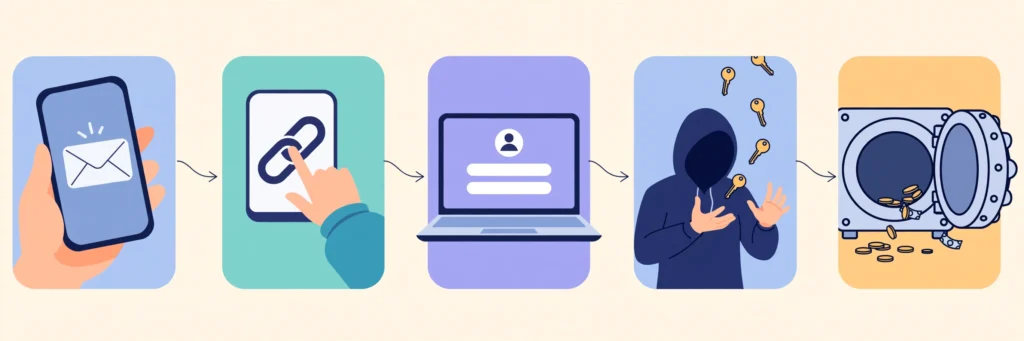
Almost every phishing attack follows the same five-stage playbook. Here it is, using a fake “unusual sign-in” bank email as the example.
Step 1: The setup. The attacker gathers targets, sometimes from leaked email lists, sometimes from public social media profiles. For broad attacks no research is needed: the message goes to millions, and the small percentage who respond is pure profit.
Step 2: The lure. The message uses your bank’s real logo and an alarming subject like “Unusual sign-in detected,” warning you to verify within 24 hours or be locked out. The sender looks almost right, maybe “security@yourb4nk.com.”
Step 3: The hook. You click and land on a pixel-perfect login page copied from the real bank’s site. Some attacks forward you to the real site afterward, so you never suspect a thing.
Step 4: The capture. You type your username, password, and perhaps a one-time code, and each keystroke is recorded. Advanced “adversary-in-the-middle” attacks relay your login to the real site in real time, capturing even your multi-factor session.
Step 5: The payoff. Within hours, the attacker logs into your real account to move money, change your recovery email, or sell your credentials. Or the link installed malware that records your keystrokes. Most victims notice only when the damage appears on a bank statement weeks later.
Every stage depends on one action from you. Break that chain anywhere and the attack fails.
What Are the Main Types of Phishing?
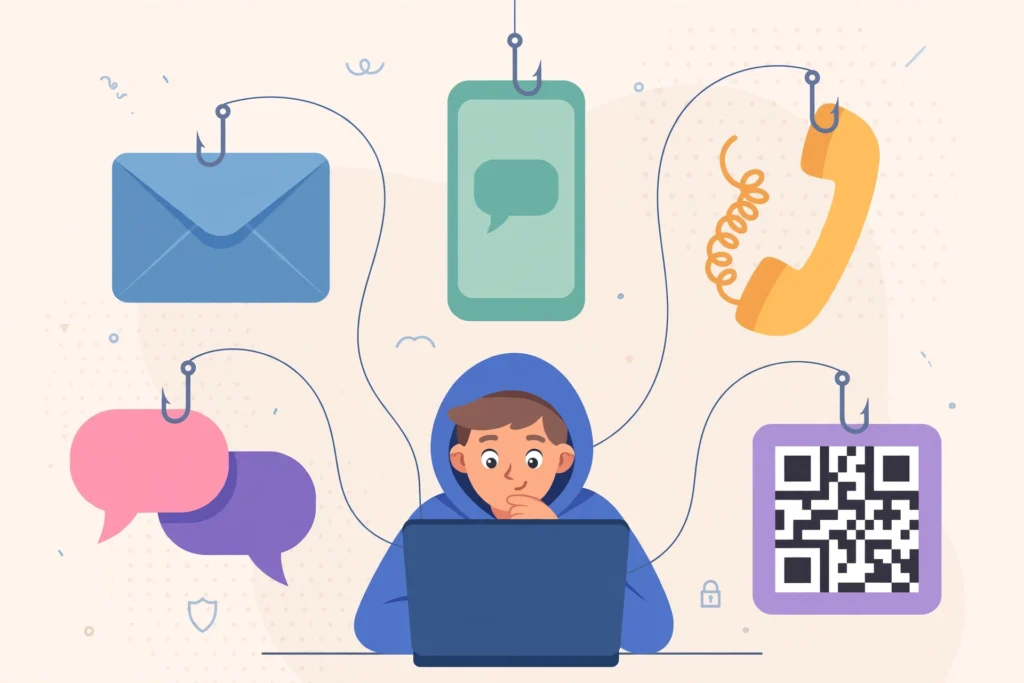
Phishing is a family of attacks using the same psychology through different channels. Here are the main types:
| Type | How it reaches you | What it looks like |
|---|---|---|
| Email phishing | Fake bank, delivery, or subscription alerts sent in bulk | |
| Spear phishing | A personalized message naming your project, colleague, or boss | |
| Whaling | A fake message from the CEO targeting executives or finance staff | |
| Smishing | Text message | Fake toll fines, package problems, or bank alerts with a link |
| Vishing | Phone call | A caller pretending to be your bank, a tax office, or tech support |
| Quishing | QR code | Malicious QR codes on stickers, posters, or in emails and texts |
| Angler phishing | Social media | Fake customer support accounts replying to your public complaints |
| Clone phishing | A copy of a real email you received, with the link swapped | |
| Business email compromise | A fake urgent wire request that appears to come from your boss | |
| Pharming | Web browser | A technical trick redirecting you from a real site to a fake one |
| Wi-Fi phishing | Public Wi-Fi | A fake hotspot named like the cafe’s network that spies on traffic |
| Pop-up phishing | Web browser | Fake virus warnings urging you to call a number or install protection |
Email phishing is still the most common type by far: the Cybersecurity and Infrastructure Security Agency (CISA) reports that over 90 percent of successful cyberattacks begin with a phishing email. But the fastest-growing variants live on your phone, where fake texts and QR scams surge.
See our phishing email examples for real scam messages broken down line by line.
What Does a Real Phishing Attack Look Like?
Here are recent, documented examples.
The toll-fee text scam. In 2024 and 2025, millions received texts claiming unpaid toll fees and threatening fines unless they paid through a link. The messages and payment pages looked official. The operation grew so large that Google took legal action against the group behind it, as reported by Norton.
The fake professor. In a documented case in Utah, a scammer posed as a professor offering students a research project spot, and one student lost $3,000. It worked because the message arrived in the right context and asked for something that felt normal.
AI-written phishing. Attackers use artificial intelligence to write flawless, personalized phishing messages at scale. A 2024 study found fully automated AI phishing emails were 350 percent more effective at getting clicks than traditional ones, matching human experts. Security firm CybelAngel estimates 67.4 percent of phishing attacks now use AI in some form.
The pattern: a familiar context, a demand for quick action, and a link you cannot easily verify. Learn that pattern and you will spot phishing everywhere.
Who Do Phishers Target, and Why?
The short answer is: everyone. Phishing is a numbers game, and every person with an online account is a potential win. Attackers simply match lures to victims: students get fake scholarships, older adults get fake bank calls, freelancers get fake invoices, gamers get free in-game items, employees get fake HR announcements, and job seekers get offers that harvest identity documents.
The economics are simple. Your email account alone is valuable: it can reset your other passwords and impersonate you to your contacts. Stolen credentials are bought and sold in bulk, so even an “unimportant” account has resale value.
The psychology comes down to a few levers. Urgency (“act within 24 hours”) stops you from thinking. Authority (“your manager,” “the tax office”) stops you from questioning. Fear and greed short-circuit judgment. And familiarity, a message mentioning your real project or colleague, disarms suspicion completely. You do not need to be careless to fall for it; being busy or distracted at the wrong moment is enough.
How Can You Recognize a Phishing Attempt?
You do not need security software to spot most phishing attempts, just this checklist. Run through these red flags whenever a message asks you to click, download, or share:
- The sender address looks wrong. Check the full domain, not just the display name. “support@paypa1.com” is not PayPal.
- The greeting is generic. “Dear customer” instead of your name suggests a bulk scam.
- It demands urgency. Threats of locked accounts or fines are designed to rush you.
- You were not expecting it. An attachment or link you did not ask for deserves suspicion, not curiosity.
- It asks for sensitive information. Real banks do not ask for passwords or card numbers by email or text.
- The link does not match. Hover over links to preview the real destination.
- The offer is too good to be true. Prizes and miracle discounts are bait.
- Something feels off. Trust the feeling and verify another way.
The golden rule: never use the contact details inside a suspicious message. If your “bank” texts about fraud, open your banking app directly. If your “boss” emails an urgent request, confirm on a different channel.
Train your eye with our phishing email examples, then make these checks a habit with our phishing awareness guide.
Phishing vs. Spam vs. Hacking: What Is the Difference?
Beginners often mix up these terms, and the distinction matters because each needs a different response.
| Term | What it is | How it differs |
|---|---|---|
| Phishing | Deceptive messages designed to trick you into giving up sensitive information | Always involves impersonation and a goal: your data, money, or access |
| Spam | Bulk unwanted messages, usually advertisements | Annoying but usually not malicious; delete it and move on |
| Hacking | Unauthorized access to a computer, account, or network | Often technical; phishing is frequently the first step that makes hacking possible |
Think of it this way: spam wants your attention, phishing wants your trust, and hacking wants your system. Phishing is a type of social engineering, the art of manipulating people instead of machines. Many ransomware attacks reported as “hacking” actually began with one employee clicking one phishing email.
How Do You Protect Yourself From Phishing?
Protection is about habits more than tools. These eight practices stop most phishing attacks:
1. Slow down. Urgency is the attacker’s weapon. No legitimate company punishes you for taking five minutes to verify.
2. Verify through official channels. Type the address yourself or use the company’s official app. Never log in through a link in a message.
3. Inspect before you click. Check the sender’s full address and preview links before clicking.
4. Use unique passwords. A password manager makes this effortless and stops one breach from opening all your accounts.
5. Turn on multi-factor authentication (MFA). Even with a stolen password, MFA blocks most attackers. Start with email, bank, and cloud accounts.
6. Keep devices updated. Updates patch the flaws that phishing-delivered malware exploits.
7. Share less publicly. Spear phishers build convincing messages from your job title and colleagues’ names on social media. Keep that circle small.
8. Use a VPN on public Wi-Fi. Open hotspots are prime territory for Wi-Fi phishing and snooping. A virtual private network encrypts your connection; our VPN definition guide explains how it works in plain language.
Finally, report what you catch. Most email apps have a “report phishing” button. One report can protect thousands of people from the same campaign.
What Should You Do If You Already Clicked?
Do not panic. Phishing fools smart people every day; what matters is responding fast:
1. Stop and disconnect. If you downloaded a file, disconnect from the internet and do not open it. If you entered details on a fake site, close the tab.
2. Change passwords, starting with email. Use a trusted device, change the compromised password first, then any account that shared it. Email is the master key to password resets.
3. Turn on multi-factor authentication on every important account if it was not on already.
4. Scan your device with reputable antivirus software to catch anything the link installed.
5. Watch your money. Check bank and card statements, and tell your bank what happened so they can flag your accounts.
6. Report it. Tell your IT or security team if it touched a work account, report the message in your email app, and notify the impersonated company.
Speed matters more than perfection: an attacker will try a stolen password within hours.
Frequently Asked Questions
What is phishing in simple terms?
Phishing is an online scam where a criminal pretends to be someone you trust, such as your bank or a delivery company, to trick you into revealing passwords, card numbers, or other private information. It usually arrives as a fake email, text, or call.
Is phishing the same as hacking?
No. Hacking means gaining unauthorized access to systems, often through technical flaws. Phishing is a form of social engineering that tricks people into handing over access voluntarily instead of breaking in. However, many hacking incidents begin with a successful phishing email.
What is spear phishing?
Spear phishing is a targeted phishing attack aimed at a specific person or organization. Instead of sending generic messages to millions, the attacker researches the victim and crafts a personalized message, which makes it far more convincing and far more dangerous.
Can phishing happen on my phone?
Yes, and phone-based phishing is growing fast. Smishing uses fake text messages, vishing uses scam phone calls, and quishing hides malicious links in QR codes. Always treat unexpected texts, calls, and QR codes with the same suspicion as strange emails.
What happens if I click a phishing link but do not enter anything?
You are probably safe, but not guaranteed. Some links trigger automatic malware downloads, so close the page at once, run an antivirus scan, and enter nothing. If you downloaded a file, delete it from your device immediately without opening it.
Conclusion
Phishing is not a technical mystery; it is a confidence trick delivered through your inbox, phone, and social feeds. Now you know what it is, how an attack unfolds, the main types, the psychology behind them, and the habits that shut them out. The best defense is simple: slow down, verify through official channels, and never hand sensitive information to a message that arrived uninvited.
Your next step is practice. Test yourself with our phishing email examples, then build daily habits with our phishing awareness guide. A few minutes of training today can save you from a very expensive click tomorrow.