VPN Definition: What a VPN Is and How It Works
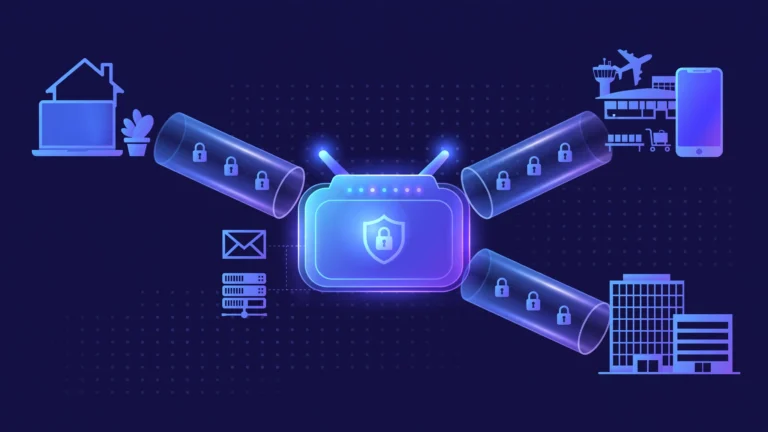
If you have ever connected to public Wi-Fi at a cafe or tried to watch a show that is not available in your country, you have probably been told to “just use a VPN.” But what is a VPN, exactly, and what does it actually do to your internet connection? A VPN, short for virtual private network, is a service that creates an encrypted tunnel between your device and a VPN server. It encrypts everything your device sends and receives, so your internet provider and anyone on your local network can only see scrambled data, while websites see the VPN server’s IP address instead of yours.
The CPN Tech Editorial Team explains the full VPN definition in plain language below: what VPN stands for, how it works step by step, what it is used for, the protocols behind it, and whether it is safe to use.
Key Takeaways
- VPN definition: A VPN (virtual private network) is a service that encrypts your internet traffic and routes it through a server run by the VPN provider, hiding your activity from your internet provider and your IP address from websites.
- A VPN protects your data on public Wi-Fi, hides your browsing from your ISP, and lets you appear to browse from another country.
- Modern VPNs rely on protocols such as WireGuard, OpenVPN, and IKEv2, which decide how encryption and the secure tunnel are built.
- A VPN is not invisibility: it does not stop malware, phishing, or tracking through logged-in accounts, and it does not make you anonymous.
- Free VPNs can cost you in other ways, so judge any provider by its independent audits, jurisdiction, and no-logs policy, not just its price.
Table of Contents
- What Does VPN Stand For?
- How Does a VPN Work? (Step by Step)
- What Is a VPN Used For?
- VPN Protocols Explained: OpenVPN, WireGuard, and IKEv2
- What Is a VPN Kill Switch? (and DNS Leaks)
- How Do You Use a VPN on an iPhone or Android Phone?
- What a VPN Cannot Do: Limits You Should Know
- Free VPN vs Paid VPN: Is a VPN Safe to Use?
- FAQ
- Conclusion
What Does VPN Stand For?
VPN stands for virtual private network, and each word tells you something about how the technology works. Virtual means the network exists in software, not in physical cables: your device joins a private network that is created on top of the public internet. Private means your traffic is encrypted, so it stays unreadable to your internet provider, the cafe Wi-Fi operator, or anyone snooping on the local network. Network means your device becomes part of the VPN provider’s network and takes on an IP address from one of its servers.
The technology is older than most people expect. In 1996, Microsoft employees developed the Point-to-Point Tunneling Protocol (PPTP), one of the first practical ways to encrypt data and send it through a “tunnel” over an existing connection, as noted in Verizon’s VPN explainer and on Wikipedia’s virtual private network page. Businesses used VPNs for decades to let employees reach office systems from home; consumer VPN services apply the same idea to everyday browsing.
How Does a VPN Work? (Step by Step)

A VPN works by creating an encrypted tunnel between your device and a VPN server. Here is what happens when you tap “Connect” in a VPN app:
- Your device connects to the VPN server. The app authenticates you and negotiates an encrypted session using a VPN protocol.
- All your traffic enters the tunnel. Every request your device makes is encrypted before it leaves. AES-256, the standard used by OpenVPN-based services, turns data into ciphertext that is impractical to break with current technology.
- The VPN server forwards your traffic. The server decrypts your requests, sends them to websites on your behalf, then encrypts the responses and sends them back through the tunnel.
- Your identity shifts. Websites and trackers see the VPN server’s IP address and location instead of yours, while your internet provider sees only encrypted data flowing to one VPN server.
Think of it like sending every letter inside an armored courier van. Your internet provider can see the van driving past, but it cannot read the letters inside, and the recipient sees the courier company’s address, not yours. That simple model is the core of the VPN definition. For a deeper look at the server side of enterprise setups, see our guide on what a VPN concentrator is.
What Is a VPN Used For?
People turn to VPNs for four main reasons:
1. Securing public Wi-Fi. Open networks in airports, hotels, and cafes are easy targets for data snooping. A VPN encrypts everything between your device and the VPN server, so an attacker on the same network sees only unreadable ciphertext.
2. Privacy from your internet provider. ISPs can normally see which websites you visit. With a VPN active, your ISP sees only that you are connected to a VPN server, not the contents of your traffic or your destinations.
3. Changing your virtual location. Websites see the VPN server’s IP address, so connecting to a server in another country makes it appear you are browsing from there, which people use to access region-restricted content while traveling.
4. Remote work. Companies use VPNs so remote employees can reach internal tools and file servers securely over the internet, as if they were in the office. Journalists and researchers in censored regions also use VPNs as a practical safety measure.
VPN Protocols Explained: OpenVPN, WireGuard, and IKEv2

A VPN protocol is the set of rules that builds the encrypted tunnel: how the two sides authenticate each other, which encryption cipher they use, and how data packets are wrapped and checked. You will usually see three protocols offered in VPN apps:
| Protocol | Encryption | Speed | Best for |
|---|---|---|---|
| WireGuard | ChaCha20 | Fastest, modern | Most users: quick, efficient, especially on phones |
| OpenVPN | AES-256 (via OpenSSL) | Slower, very reliable | Maximum compatibility and trusted track record |
| IKEv2/IPsec | AES-256 (via IPsec) | Fast, quick reconnection | Mobile devices that switch between Wi-Fi and cellular |
WireGuard, developed by Jason Donenfeld and merged into the Linux kernel in 2020, has a famously small codebase (around 4,000 lines, per the WireGuard project), which makes it easier to audit and faster to run. OpenVPN is the veteran open-source protocol with the longest security track record; its larger codebase has been audited for nearly two decades. IKEv2/IPsec is a standard built jointly by Microsoft and Cisco that reconnects very quickly when your phone moves between networks, which is why many mobile VPN apps default to it.
For beginners, the practical advice is simple: use WireGuard if your provider offers it, fall back to OpenVPN for maximum compatibility, and do not worry much beyond that. Avoid the ancient PPTP protocol entirely; its encryption is considered broken.
What Is a VPN Kill Switch? (and DNS Leaks)
Two features separate a good VPN setup from a leaky one, and both are worth understanding.
A VPN kill switch is a safety feature that blocks all internet traffic on your device if the VPN connection drops unexpectedly. Without it, your device would silently fall back to your normal connection, briefly exposing your real IP address and unencrypted traffic. Good VPN apps let you enable the kill switch in settings, and some operating systems now support it at the system level.
A DNS leak happens when your DNS requests (the lookups that turn a domain name into an IP address) travel outside the encrypted tunnel to your ISP’s DNS servers. Your ISP could then log every site you visit even while the VPN is connected. Reputable VPN apps route DNS through the tunnel automatically and include leak protection.
You can verify both yourself: connect your VPN, visit a DNS leak test website, and confirm it shows your VPN server’s location and provider instead of your real ISP.
How Do You Use a VPN on an iPhone or Android Phone?
Setting up a VPN on a phone is the most common beginner scenario, and it takes about two minutes:
- Download a reputable VPN app from the App Store or Google Play. Read reviews and check for an independent no-logs audit before installing.
- Create an account and choose a plan. Most quality services are paid, usually a few dollars a month on an annual plan.
- Tap “Connect” in the app. Your phone will ask permission to add a VPN configuration, which is normal: this is how iOS and Android route traffic through the tunnel.
- Pick a server location if the app offers a list. Nearby servers are usually fastest; distant servers change your virtual location.
- Turn on the kill switch and leak protection in the app’s settings, then run a DNS leak test on the phone itself.
On an iPhone specifically, you can verify the VPN is active by checking Settings > General > VPN, where your connection should show as “Connected,” and a small VPN icon appears in the status bar on some iOS versions. One iOS quirk to know: certain Apple system services may bypass VPN tunnels in some configurations, and iOS can briefly reconnect over your normal network when the VPN drops before the kill switch engages.
What a VPN Cannot Do: Limits You Should Know
Marketing sometimes makes VPNs sound like invisibility cloaks. They are not. Here are the honest limits:
- A VPN does not block malware or phishing. A malicious download is still malicious inside the tunnel. If a phishing email tricks you into handing over your password, no VPN can stop it. Our phishing email examples guide shows the warning signs to watch for.
- A VPN does not make you anonymous. Websites can still track you through cookies, logged-in accounts, and browser fingerprinting. A VPN hides your IP address, not your identity.
- The VPN provider can see your traffic. You are shifting trust from your ISP to the VPN company, which is why no-logs policies and independent audits matter so much.
- A VPN can slow your connection. Encryption and the extra hop through the VPN server add some latency, though modern protocols like WireGuard keep this small.
- Some services block VPNs. Streaming platforms and banks actively detect and block known VPN server IPs.
A VPN is one strong layer of a privacy setup, not the whole setup. Think of it as a great lock on your front door: essential, but not a substitute for the rest of your security.
Free VPN vs Paid VPN: Is a VPN Safe to Use?
So, is a VPN safe to use? Generally, yes, if you choose a reputable provider. But the business model matters more than the price tag.
Running VPN servers worldwide costs real money, so ask how a provider pays its bills. Free VPNs have repeatedly been caught logging and selling user data, injecting ads, or throttling speeds to push upgrades. Some free tiers from otherwise reputable paid providers are legitimate marketing, but most standalone free VPNs are not trustworthy.
When judging any provider, paid or free, look for these trust signals:
- Independent no-logs audit published by a named security firm, not just a marketing claim.
- RAM-only servers, which cannot retain data after a reboot.
- Jurisdiction outside surveillance-sharing alliances when possible.
- Transparency reports and a public track record of resisting data requests.
The technology itself is sound: the same encryption and tunneling concepts protect corporate networks and online banking every day. What varies is the provider’s honesty, which is why audits and open-source clients carry more weight than flashy promises.
FAQ
What does VPN stand for?
VPN stands for virtual private network. The name describes a private, encrypted network created virtually (in software) on top of a public network like the internet. It was coined in the era of early business VPNs, and consumer VPN services use the same underlying tunneling technology today.
What is a VPN used for?
A VPN is used to encrypt your internet traffic, hide your browsing activity from your internet provider, protect data on public Wi-Fi, and change your virtual location by routing traffic through servers in other countries. Businesses also use VPNs to give remote employees secure access to office networks.
Is a VPN safe to use?
A VPN is safe to use when it comes from a reputable provider with an independently audited no-logs policy. The encryption itself is strong. The main risk is choosing a provider that logs or sells your data, which is why free VPNs with unclear business models are riskier than audited paid services.
Does a VPN hide everything I do online?
No. A VPN hides your traffic from your ISP and your IP address from websites, but it does not block malware, stop phishing, prevent tracking through logged-in accounts or cookies, or make you anonymous. Treat a VPN as one layer of privacy alongside good security habits.
Can I use a VPN on my iPhone?
Yes. Install a reputable VPN app from the App Store, grant the VPN configuration permission when prompted, and tap Connect. You can confirm it is active under Settings > General > VPN. Enable the app’s kill switch and run a DNS leak test on the phone to verify nothing is leaking.
Do I need a VPN on my home Wi-Fi?
It depends on your goal. Home Wi-Fi is safer than public Wi-Fi against local snooping, but your ISP can still see your browsing. If you want privacy from your ISP or need to change your virtual location, a VPN helps at home too. See our Wi-Fi 7 router buying guide for hardware with VPN client support.
Which VPN protocol should beginners use?
Use WireGuard if your VPN app offers it: it is fast, modern, and efficient, especially on phones. OpenVPN is the trusted veteran and a fine choice if WireGuard is unavailable. Avoid PPTP, an outdated protocol whose encryption is no longer considered secure.
Conclusion
The VPN definition is simpler than the jargon makes it sound: a virtual private network encrypts your internet traffic and routes it through a server run by your VPN provider, so your internet provider cannot read your activity and websites see the server’s IP address instead of yours. Protocols like WireGuard and OpenVPN build the secure tunnel, and features like kill switches keep it from leaking.
A VPN is a useful privacy tool for public Wi-Fi, ISP privacy, and virtual location changes, but it is not a magic shield. It will not stop phishing, malware, or account-based tracking, and its trustworthiness depends on the provider you choose. If you get one, pick an audited provider, enable the kill switch, and test for leaks. For more beginner-friendly tech explainers, explore the rest of CPN Tech, where we break down technology topics explained simply.