What Are Trojans? Trojan Horse Malware Explained
What Are Trojans? Trojan Horse Malware Explained
Trojans are one of the most misunderstood threats in cybersecurity. People call them “Trojan horse viruses,” but Trojans are not viruses at all. A Trojan is malware that pretends to be a legitimate program, such as a free game, a software update, or an email attachment, while secretly carrying out malicious actions on your device.
What are trojans, in simple terms? A Trojan is malware that disguises itself as harmless software to trick you into installing it. Unlike a computer virus, a Trojan cannot copy itself or spread on its own. It depends entirely on deception: the attacker hides malicious code inside something you trust, and once you run it, the Trojan can steal your passwords, spy on your activity, or give a criminal remote control of your device.
Key Takeaways
- A Trojan is malware disguised as legitimate software; it needs you to install it before it can do any damage.
- Trojans are not viruses or worms: they cannot self-replicate, so deception and social engineering are their main weapons.
- Common types include backdoor Trojans, banking Trojans, downloader Trojans, spyware Trojans, and fake antivirus programs.
- Famous examples include Zeus and Emotet, which caused massive financial damage worldwide.
- Remove most Trojans by disconnecting from the internet, scanning in Safe Mode, and changing passwords from a clean device.
- Prevention is simple: download only from official sources, keep software updated, and use reputable antivirus protection.
Table of Contents
- What Is a Trojan Horse in IT?
- How Do Trojans Work?
- What Is the Difference Between a Trojan, a Virus, and a Worm?
- What Are the Main Types of Trojans?
- What Are Some Famous Trojan Examples?
- How Do Trojans Get Onto Your Device?
- What Are the Warning Signs of a Trojan Infection?
- Can Trojans Infect Phones?
- How Do You Remove a Trojan?
- How Can You Prevent Trojan Infections?
- FAQs About Trojans
- Conclusion
What Is a Trojan Horse in IT?
What does “Trojan horse” mean in IT? The Trojan horse IT definition is straightforward: a Trojan is a program that claims to perform one function but secretly performs another, malicious one. The name comes from the ancient Greek story of Troy, in which soldiers hid inside a giant wooden horse to sneak into the walled city.
In computing, a Trojan horse works the same way. It arrives looking like something you want, a useful app, a document, or a “free” premium game, while hiding malicious code. The moment you open or install it, the Trojan activates. This is why the phrase “Trojan horse virus” is technically wrong but extremely common: Trojans are malware, and viruses are a different kind of malware. A virus spreads by itself, while a Trojan waits for you to invite it in.
How Do Trojans Work?
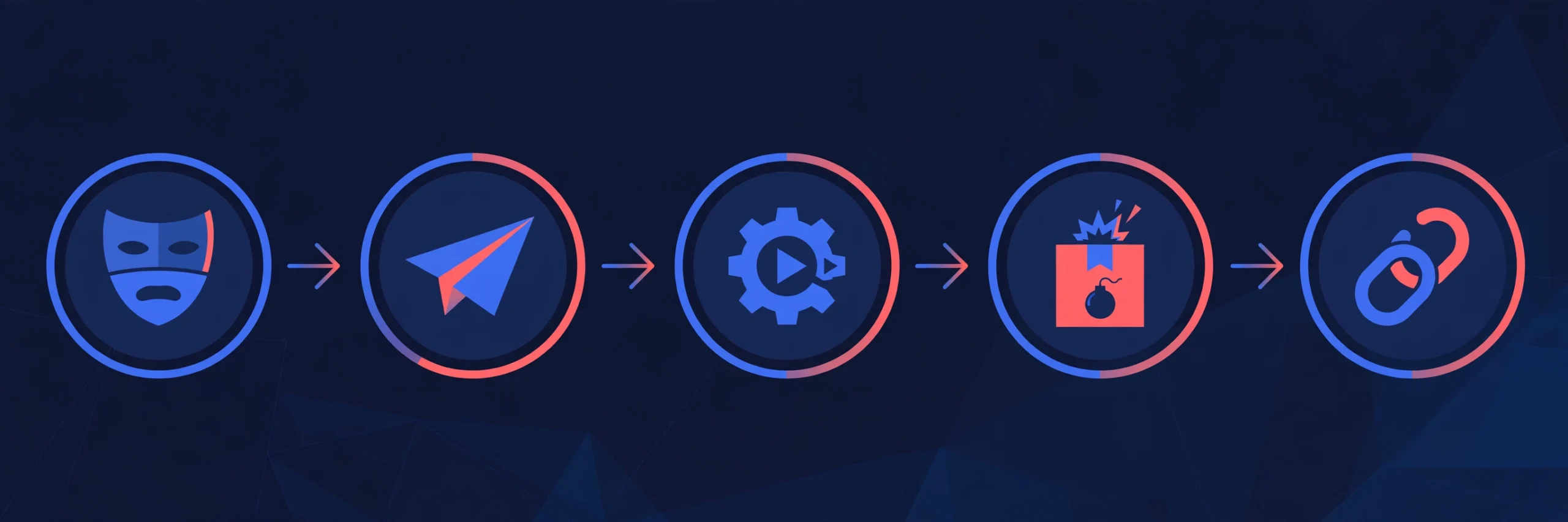
Trojans follow a predictable attack pattern. Security researchers describe five stages.
1. Disguise. The attacker wraps malicious code inside something trustworthy: a cracked game, a fake software update, a “free” utility, an invoice PDF with macros, or a pirated movie. The disguise matches something the victim already wants.
2. Delivery. The Trojan reaches the victim through phishing emails, fake download sites, malicious advertising, compromised websites, USB drives, or weakly reviewed app stores.
3. Execution. The victim runs the file voluntarily. This human action is the trigger, and without it nothing happens. Trojans are a social engineering threat first and a technical threat second.
4. Payload. The hidden malicious function activates: logging keystrokes, opening a remote backdoor, stealing saved passwords, encrypting files for ransom, or downloading more malware. Many Trojans contact a command-and-control server so the attacker can issue instructions in real time.
5. Persistence. Sophisticated Trojans establish a foothold that survives reboots, letting the infection sit quietly for weeks or months while the attacker collects data.
What Is the Difference Between a Trojan, a Virus, and a Worm?
This is one of the most searched questions about Trojans, and most articles answer it in a single line. Here is the full picture.
| Feature | Trojan | Virus | Worm |
|---|---|---|---|
| Self-replicates | No | Yes, needs a host file | Yes, spreads on its own |
| Needs user action | Yes, you must run it | Yes, you must open the host file | No, exploits network flaws |
| Typical goal | Spy, steal data, open backdoors | Corrupt or destroy files | Spread fast, build botnets |
The key insight: a Trojan is the only one of the three that relies completely on deception rather than replication. That is why user awareness matters more for Trojans than for any other malware type. No software can stop you from clicking “Install” on something you trust.
Note that real-world malware blends categories. Emotet started as a banking Trojan and evolved into a loader that delivered other malware, and ransomware families often use Trojan-style delivery (a fake invoice attachment) even though ransomware is a separate category.
What Are the Main Types of Trojans?
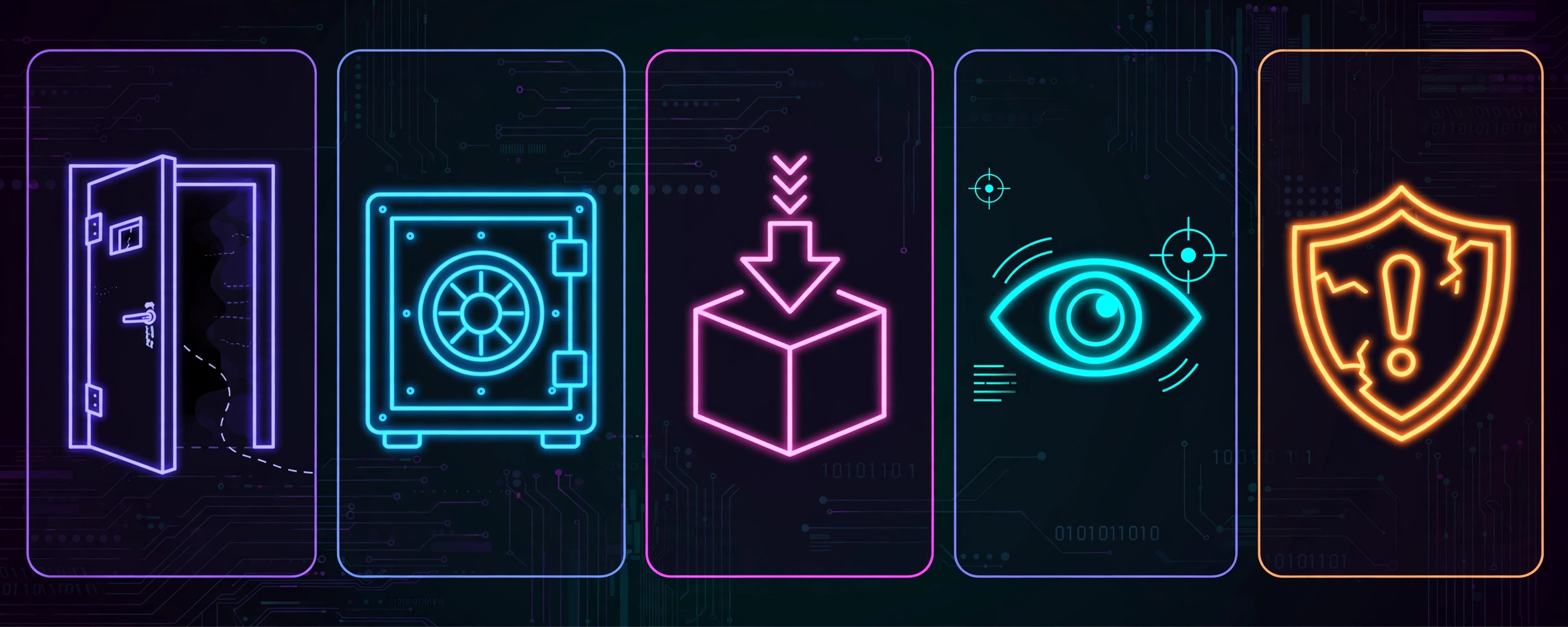
Trojans come in many flavors, each built for a different criminal job.
Backdoor Trojans
A backdoor Trojan opens a secret entry point into your device so the attacker can return whenever they like. Through this backdoor, criminals can run commands, browse your files, install more malware, or use your computer as part of a botnet. When remote control is the whole point, security professionals often call it a RAT, short for Remote Access Trojan.
Banking Trojans
Banking Trojans specialize in stealing financial credentials. They capture login details for online banking and payment apps, often by logging keystrokes or intercepting web forms as you fill them in. Some inject fake login fields into real banking websites. Zeus (also known as Zbot) is the most infamous banking Trojan, and its leaked source code let criminals build countless variants.
Downloader and Dropper Trojans
These Trojans exist to fetch and install more malware. A downloader pulls its payload from the internet after infection, while a dropper carries the payload hidden inside itself. Emotet became famous in this role: it infected machines and then delivered ransomware as a second stage. Kill the dropper early, and you stop everything it would have delivered.
Spyware and Infostealer Trojans
Infostealers quietly harvest credentials, browser cookies, chat logs, and keystrokes, then send the haul back to the attacker. Stolen credentials are sold in bulk on underground markets, which is why a single Trojan infection can lead to hacked accounts months later.
Fake Antivirus Trojans
Fake antivirus programs, sometimes called scareware, display alarming warnings that your device is infected, then demand payment for “removal.” The warnings are fabricated, and the program itself is the malware. This type relies entirely on fear and urgency to make victims pay.
What Are Some Famous Trojan Examples?
Real cases show what Trojans can do at scale.
Zeus (2007): A banking Trojan that infected millions of computers and stole online banking credentials. The FBI estimated Zeus caused hundreds of millions of dollars in losses, and its leaked source code spawned generations of copycats.
Emotet (2014 to 2021): Started as a banking Trojan, then evolved into one of the most dangerous malware delivery platforms in history, spreading through malicious email attachments and delivering ransomware. An international law enforcement operation took its infrastructure down in January 2021.
The pattern is consistent: neither broke through firewalls with pure technical wizardry. Both depended on users installing something they believed was safe.
How Do Trojans Get Onto Your Device?
Knowing the delivery routes is half the defense. These are the channels attackers use most.
- Phishing emails: malicious attachments or links disguised as invoices, shipping notices, resumes, or account alerts. For a deeper look at the tricks attackers use, read our guide on what is phishing.
- Fake download sites: lookalike pages for popular software that serve a Trojanized installer instead of the real program.
- Pirated software and cracks: key generators, cracked games, and mod menus are among the most infected files on the internet.
- Malicious ads: compromised ad networks can redirect visitors to Trojan downloads without any click at all.
- USB drives and shared files: Trojans spread in offices and schools through infected drives and shared folders.
- Fake mobile apps: clones of popular apps in third-party stores, which sometimes slip past official store reviews.
Notice how many of these start with an email. Phishing remains the number one Trojan delivery method, so spotting scam emails is a core cybersecurity skill. Our breakdown of common phishing scams pairs well with this article.
What Are the Warning Signs of a Trojan Infection?
Trojans try to stay hidden, but infections often leave clues:
- Your device suddenly runs much slower, overheats, or the fan spins loudly at idle.
- Pop-up windows appear even when your browser is closed.
- Your browser homepage or search engine changes without your permission.
- New toolbars, apps, or browser extensions appear that you did not install.
- Friends receive strange messages or emails sent from your accounts.
- You get login alerts or two-factor prompts for accounts you did not try to access.
- Your antivirus is disabled and you cannot turn it back on.
- Data usage spikes unexpectedly, which can indicate data being uploaded to an attacker.
- Files are renamed, encrypted, or missing.
One or two of these signs alone do not prove an infection; a slow computer might just need a cleanup. But several together, especially unexpected account alerts or a disabled antivirus, mean you should act immediately.
Can Trojans Infect Phones?
Yes. Mobile Trojans are a growing problem, especially on Android. They hide inside apps installed from outside official stores, and occasionally a malicious app passes official store review before being removed. A mobile Trojan can steal your credentials, intercept SMS messages (which defeats SMS-based two-factor codes), and overlay fake login screens on top of real banking apps.
iPhones are harder to infect because iOS restricts app sideloading, but they are not immune. Jailbroken iPhones lose those protections, and phishing links can still steal credentials on any phone.
Practical mobile rules: install apps only from the official App Store or Google Play, check an app’s reviews and developer name before installing, question apps asking for permissions they do not need, and keep your phone’s operating system updated.
How Do You Remove a Trojan?
If you suspect an infection, work through these steps in order. Speed matters: every hour a Trojan stays connected is another hour of potential data theft.
- Disconnect from the internet. Unplug the network cable or turn on airplane mode. This cuts the Trojan off from its command-and-control server and stops data from leaving your device.
- Do not log in to anything sensitive on the infected device. No banking, no email, no password managers. Assume everything you type is being watched.
- Boot into Safe Mode. On Windows, Safe Mode loads only essential programs, which prevents many Trojans from starting. On Mac, use Safe Boot.
- Run a full scan with reputable antivirus software. Let it quarantine or delete what it finds, then run a second scan with a different on-demand scanner for confirmation.
- Remove persistence manually if needed. Check startup programs, scheduled tasks, and browser extensions for anything you do not recognize.
- Restore from a clean backup if the infection is deep. For serious infections, especially banking Trojans, restoring from a backup made before the infection is the safest option.
- Change your passwords from a clean device. Start with email, banking, and password manager accounts. Enable two-factor authentication everywhere.
- Monitor your accounts. Watch bank statements and account activity for the next few weeks. Consider freezing your credit if financial data may have been stolen.
- On a work device, report to your IT or security team immediately. Do not try to clean a corporate device alone.
How Can You Prevent Trojan Infections?
Prevention is simpler than removal. Make these habits automatic.
- Download only from official sources. Get software from the developer’s official site or a trusted app store.
- Treat unexpected attachments as hostile. Verify through another channel before opening an unannounced attachment, even from someone you know.
- Keep everything updated. Operating system, browser, and app updates patch the vulnerabilities Trojans exploit.
- Use reputable antivirus and keep it current. Real-time protection catches many Trojans at the download stage.
- Be skeptical of “free” premium content. Cracked software, free movies, and game cheats are the most infected files online.
- Use strong, unique passwords plus two-factor authentication. Unique passwords stop one stolen credential from unlocking your other accounts.
- Back up regularly. A clean, recent backup turns a disaster into an inconvenience.
- Learn the phishing playbook. Most Trojans arrive by email, so spotting scam messages is the single most valuable defense you can build.
FAQs About Trojans
Is a Trojan a virus?
No. A virus attaches itself to files and replicates on its own, while a Trojan cannot self-replicate and relies on tricking you into installing it. Both can cause serious damage, but they work in completely different ways.
What does a Trojan horse do once it infects your computer?
It depends on the payload: stealing passwords, logging keystrokes, spying on your activity, opening a backdoor for remote control, downloading more malware, or encrypting your files. Many Trojans combine several of these functions.
Can antivirus remove a Trojan?
Often, yes. Reputable, up-to-date antivirus software can detect and remove most known Trojans by quarantining the malicious files. Advanced or persistent infections may need Safe Mode scanning or a full system restore from a clean backup.
Can a Trojan infect an iPhone or Android phone?
Yes, especially Android phones. Mobile Trojans hide inside fake apps and can steal credentials, intercept text messages, and target banking apps. iPhones are harder to infect, but phishing can still steal credentials on any phone.
How do I know if I have a Trojan?
Watch for sudden slowdowns, pop-ups with the browser closed, unexpected login alerts, a disabled antivirus, new programs you did not install, and strange messages from your accounts. Several together mean you should scan immediately.
What is the difference between a Trojan and ransomware?
A Trojan is malware based on deception, while ransomware is a payload that encrypts your files and demands payment. Many ransomware attacks arrive as Trojans: you install what looks harmless, and it turns out to be ransomware.
Are Trojans illegal?
Yes. Creating, distributing, or using Trojans to access systems without permission is a crime in most countries under computer fraud and abuse laws. Researchers who study Trojans work in controlled environments with strict legal boundaries.
Conclusion
Trojans succeed because they exploit trust, not because they defeat technology. A Trojan cannot force its way in the way a worm can; it needs you to open the door. That weakness is also your greatest defense. Every download you skip from a shady site, every unverified attachment you refuse to open, and every update you install on time is a door that stays shut.
Start with the basics today: update your operating system, run a full antivirus scan, turn on two-factor authentication for your important accounts, and learn to recognize phishing emails before you need to. For more beginner-friendly security guides, browse the CPN Tech homepage and build your defenses one article at a time.