How Does a VPN Work? A Simple Explanation
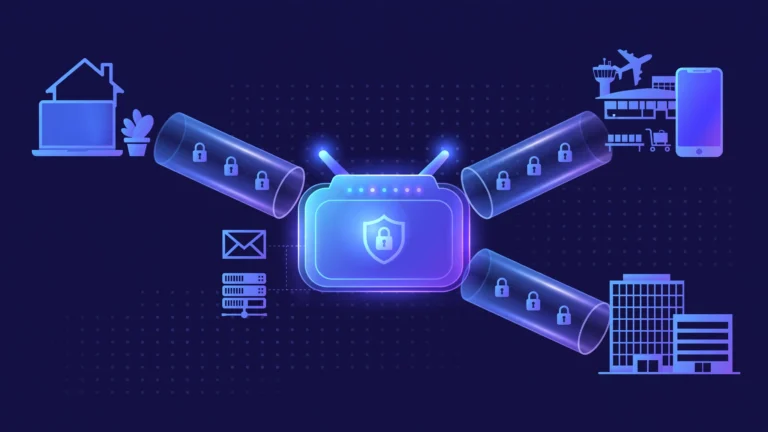
You have probably heard the advice: turn on a VPN on hotel Wi-Fi. But what does that little toggle actually do? A VPN works by creating an encrypted tunnel between your device and a VPN server. Your traffic travels through this tunnel, exits from the server, and reaches the internet from there. Websites see the server’s IP address instead of yours, and your ISP sees only encrypted data it cannot read.
In this guide, we walk through every step of a VPN connection in plain English: the handshake, the encryption, the tunnel, and the exit. You will also learn which VPN protocols are worth using in 2026, and what a VPN cannot protect you from.
Key Takeaways
- A VPN creates an encrypted tunnel between your device and a VPN server, hiding your traffic from your internet provider and your IP address from websites.
- Every connection follows four steps: authentication, encryption, encapsulation, and exit through the server.
- Modern protocols like WireGuard are fast and secure; the outdated PPTP protocol should be avoided entirely.
- A VPN cannot make you anonymous: account sign-ins, cookies, and browser fingerprinting still identify you.
- You shift trust from your ISP to your VPN provider, so choose one with an independently audited no-logs policy.
Table of Contents
- What Is a VPN in Simple Terms?
- How Does a VPN Work, Step by Step?
- What Happens to One Website Visit Inside the Tunnel?
- What Is a VPN Protocol and Which One Should You Use?
- What Are the Main Types of VPN?
- What Does a VPN Actually Hide From Your Internet Provider?
- What Are the Benefits of Using a VPN?
- What Are the Limits of a VPN?
- What Can Go Wrong? Leaks, Drops, and the Kill Switch
- Does a VPN Slow Down Your Internet?
- Should You Use a Free VPN or a Paid One?
- How Do You Choose a VPN You Can Trust?
- Frequently Asked Questions
What Is a VPN in Simple Terms?
VPN stands for virtual private network, and each word describes the technology. Virtual, because the private network exists in software, not cables. Private, because your traffic is encrypted and unreadable to anyone watching. Network, because your device joins the VPN company’s network and gets an IP address there. For the formal definition, see our VPN definition guide.
VPNs were originally built for businesses, so remote employees could reach internal systems safely over the public internet. The consumer version works on the same principles, with the provider’s server as the secure exit point instead of a corporate gateway. The oldest widely used protocol, PPTP from 1996, is now cryptographically broken and should never be used.
How Does a VPN Work, Step by Step?
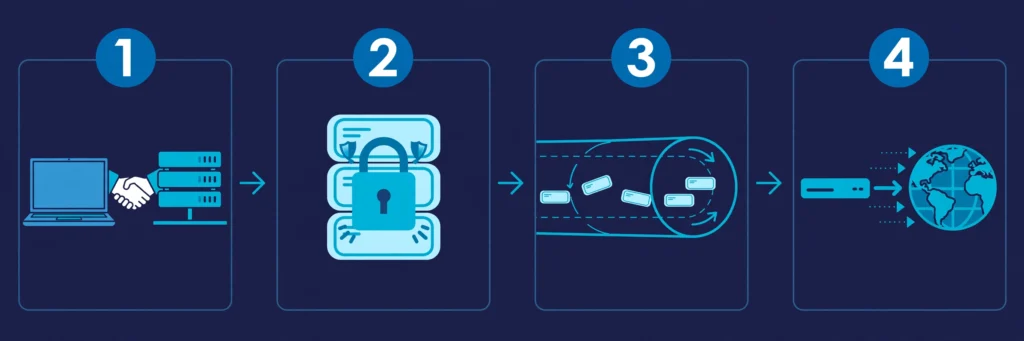
Every VPN connection follows the same four steps. Here is what happens in each.
Step 1: Authentication and the handshake
You open the VPN app, choose a server location, and press connect. The app proves your account is valid with your credentials or a digital certificate. Then your device and the server agree on the encryption keys for the session: think of it like a padlock you mail to someone, where anyone can close it to send you data, but only you hold the key to open it. The key exchange uses TLS or the Noise Protocol, so the shared secret is never sent across the network in readable form.
Step 2: Encryption
From this point on, every packet leaving your device is encrypted first. Reputable VPNs use AES-256 or ChaCha20, the same class of encryption banks and government agencies rely on. Without the key, intercepted traffic is meaningless ciphertext.
Step 3: Encapsulation (building the tunnel)
Each encrypted packet is placed inside a new outer packet addressed to the VPN server, like a letter in a second envelope. The server unwraps it and passes the request on. This encrypted, wrapped connection is the VPN tunnel.
Step 4: Exit, decrypt, and forward
The VPN server decrypts your request and forwards it to the website under the server’s own IP address. The reply travels the same path in reverse: back to the server, encrypted through the tunnel, and decrypted on your device. To the website, the VPN server appears to be the visitor, not you.
What Happens to One Website Visit Inside the Tunnel?
Suppose you type a website address with the VPN connected:
- DNS lookup, inside the tunnel. Your device asks for the site’s IP address. A good VPN resolves this on its own DNS servers, hiding the domain from your provider.
- Encrypt and wrap. Your request is encrypted, wrapped in an outer packet for the VPN server, and sent out.
- Decrypt and exit. The server unwraps and decrypts the request, then forwards it to the website under the server’s IP address.
- Return trip. The website replies to the server, which encrypts the reply, sends it back through the tunnel, and your device decrypts and renders the page.
In short: your provider saw one encrypted connection, and the website saw the server’s IP, never yours.
What Is a VPN Protocol and Which One Should You Use?

The protocol is the set of rules for building the tunnel. Most apps choose one automatically.
| Protocol | Speed | Security | Best for |
|---|---|---|---|
| WireGuard | Fastest | High | Everyday use on any device |
| NordLynx / Lightway | Very fast | High | Speed on their providers’ apps |
| OpenVPN | Medium | Very high | Routers and restrictive networks |
| IKEv2/IPsec | Fast | High | Phones switching between Wi-Fi and mobile data |
| Obfuscated / stealth modes | Medium | High | Networks that block VPN traffic |
WireGuard is the current consumer standard. Its codebase is roughly 4,000 lines versus OpenVPN’s 100,000-plus, meaning less room for vulnerabilities and faster audits. It uses the Noise Protocol and ChaCha20, and reconnects quickly when your phone switches networks.
OpenVPN is the long-standing privacy benchmark: open source and extensively audited, but slower than WireGuard. IKEv2/IPsec ships inside most mobile operating systems, so it connects fast and survives network switches. On networks that block VPNs, use an obfuscated protocol that disguises VPN traffic as regular browsing.
What Are the Main Types of VPN?
The three main VPN categories differ in who operates them and what they protect:
| Type | Who uses it | What it connects | Who controls it |
|---|---|---|---|
| Personal VPN | Individual consumers | Your device to the provider’s server | The VPN provider |
| Remote access VPN | Employees, contractors | Your device to the company network | Company IT |
| Site-to-site VPN | Businesses | Two or more office networks | Company IT |
Personal VPNs are the consumer apps most people mean when they say VPN. A browser extension variant covers that browser only and generally lacks a kill switch. A proxy also changes your visible IP but does not encrypt traffic: our VPN vs proxy comparison explains when each fits. The rest of this article covers personal VPNs.
What Does a VPN Actually Hide From Your Internet Provider?
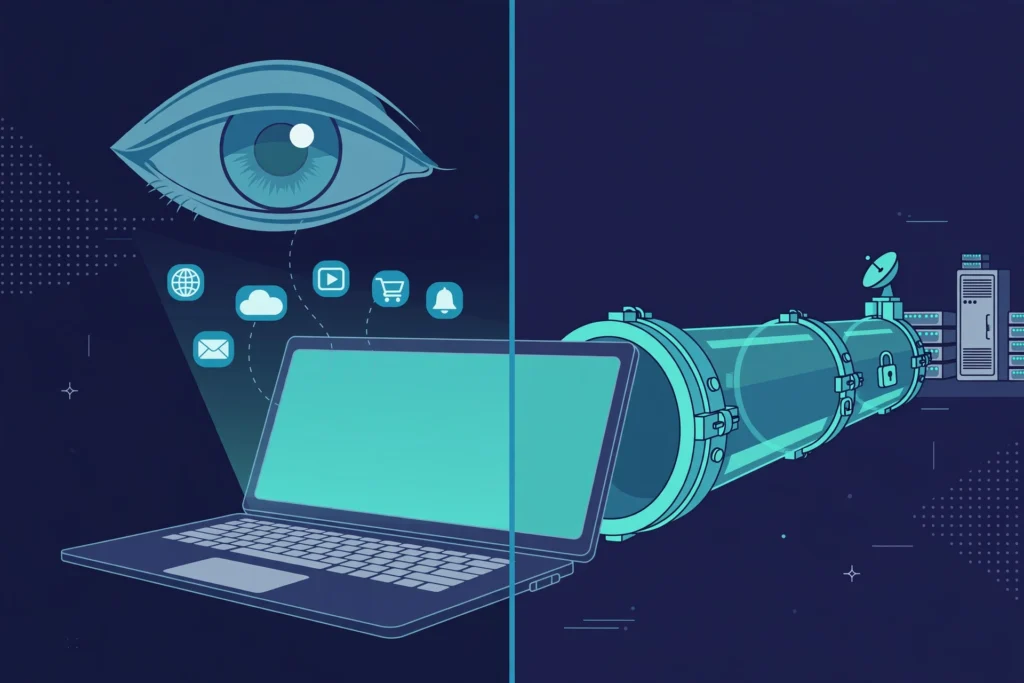
Without a VPN, your provider sees every domain you request, how long you spend there, and when. HTTPS hides page contents, but not which sites you visit. In the UK, providers can be required to keep those records for up to a year; in the US, they may use them for advertising.
With a VPN active, all of that collapses into one encrypted connection. Your provider sees the VPN server’s IP address plus the volume and timing of the data. It cannot see the domains, searches, or page contents.
The honest trade: a VPN changes who can see your traffic, not whether it can be seen. Your VPN provider now holds your ISP’s old position, which is why its logging policy matters more than any marketing claim.
What Are the Benefits of Using a VPN?
- Safer public Wi-Fi. Hotel, airport, and cafe networks are shared with strangers; encryption makes intercepted traffic worthless. This is the clearest security case for a VPN.
- Privacy from your provider. It sees a connection to a VPN server and nothing about the sites behind it.
- Region changes while traveling. A server abroad unblocks that country’s streaming catalog or lets you reach home banking. Streaming platforms actively block known VPN addresses, so success varies by provider.
- Torrent privacy. A VPN keeps your IP address out of the torrent swarm; other peers see the server’s IP instead.
- Working around network filters. School, office, and national blocks filter by destination, and with a VPN the only visible destination is the VPN server.
For more beginner-friendly explainers on staying safe online, browse the rest of CPN Tech.
What Are the Limits of a VPN?
A VPN is a specific tool, and marketing sometimes promises more than the technology delivers. Here is what it cannot do:
- It does not make you anonymous. Signing in to an account identifies you regardless of your IP address, whichever country you appear to connect from.
- It does not stop cookies or browser fingerprinting. Trackers that identify your browser keep working. A private window and a tracker blocker handle those.
- It does not remove malware. Some VPNs filter known malicious domains, but nothing in the tunnel scans files or cleans an infected computer.
- It does not hide your activity from the VPN company. You move trust from your ISP to the provider, so check that its no-logs policy has been independently audited.
- It does not change what is legal. VPNs are legal in most countries, but a short list restricts or bans them, including China, Iran, Turkmenistan, Belarus, and Oman. Copyright law, local law, and a site’s terms still apply.
What Can Go Wrong? Leaks, Drops, and the Kill Switch
A VPN can fail in three main ways:
Tunnel drops. If the connection drops, traffic can silently fall back to the open internet, exposing your real IP. A kill switch blocks all traffic until the tunnel returns. Enable it from your first session; our kill switch guide covers each platform.
DNS leaks. If a DNS request escapes the tunnel, your provider learns which domains you visit. Reputable VPNs route DNS through their own servers with leak protection. Verify yours at ipleak.net: it should show the VPN company’s servers, not your provider’s.
IPv6 leaks. Some VPNs tunnel only IPv4, letting IPv6 requests slip outside. Good providers tunnel both or disable IPv6 while connected.
Split tunneling routes selected apps outside the VPN, useful for apps that block VPN connections, such as some banking apps. Anything routed outside gets no VPN protection at all.
Does a VPN Slow Down Your Internet?
Yes, slightly. Encryption adds processing to every packet, and traffic detours through the VPN server. On a nearby server with a modern protocol, the difference is hard to notice: in October 2026 tests, NordVPN kept 97 percent of a 190 Mbps connection’s speed on a UK server and 84 percent in Japan, still enough for several 4K streams at once. Distant servers also raise ping, which you notice in video calls and online games. For speed, choose WireGuard and the nearest server.
Should You Use a Free VPN or a Paid One?
Ask how a free VPN pays its bills: servers, bandwidth, and audits cost real money. Some free tiers are honest loss leaders with limits: Proton VPN offers a free plan with no data cap, though it chooses the server country for you. Others monetize through ads, upsells, or the worst option, logging and selling your browsing data, which defeats the entire purpose.
Paid plans are affordable: long plans cost under three and a half dollars a month at first, though renewals often cost two to three times more. Most reputable paid VPNs refund in full within 30 days. If privacy is your goal, a paid plan with an independently audited no-logs policy is the only option that makes sense.
How Do You Choose a VPN You Can Trust?
Your VPN provider sees what your ISP used to see. Choose accordingly:
- An audited no-logs policy. An independent firm should have inspected the servers and confirmed no activity records are kept. Marketing promises are not evidence.
- A kill switch and leak protection that keep your IP address and DNS requests inside the tunnel when the connection drops.
- Speed on nearby servers. A good VPN keeps over 90 percent of your speed nearby.
- Server countries you actually need, for streaming or travel, not just a big headline number.
- Architecture, not just policy. Leading VPNs run RAM-only servers, so a reboot wipes everything stored. Jurisdiction matters too: Panama and the British Virgin Islands have no data retention laws, unlike surveillance-alliance members.
Open-source apps allow independent code review; closed-source apps require trust. When features look equal, pick the provider audited most recently and most thoroughly.
Frequently Asked Questions
Does a VPN make you completely anonymous?
No. A VPN hides your IP address and encrypts your traffic, but websites still identify you through account sign-ins, cookies, and browser fingerprinting. A VPN is a privacy layer, not an invisibility cloak. For stronger anonymity, pair it with a privacy-focused browser and accounts that are not tied to your real name.
Can my internet provider see which websites I visit when my VPN is on?
No. Your provider sees only an encrypted connection to the VPN server’s IP address, plus the timing and volume of the data. It cannot see the domains you visit, your searches, or page contents. Note the trade: your VPN provider now holds the position your provider used to hold.
Is it legal to use a VPN?
Yes, in most countries, including the US, the UK, Canada, Australia, and EU member states. A few countries restrict or ban VPNs, including China, Iran, Turkmenistan, Belarus, and Oman. A VPN does not change the law: illegal activity stays illegal, and a website’s terms still apply.
Will a VPN protect my computer from viruses?
Not by itself. A VPN encrypts data in transit but does not scan files or clean infections. Some VPNs add extras, such as domain filters that block known malicious sites, but these do not replace dedicated antivirus software. Treat them as a bonus layer, not a substitute.
Why does a VPN slow down my connection?
Encryption adds processing to every packet, and your traffic takes a detour through the VPN server before reaching the website. On a nearby server with a modern protocol like WireGuard, the slowdown is hard to notice. Distant servers add more delay, which you feel most in video calls and online games.
Conclusion
Now you know how a VPN works: authentication sets up the session, encryption scrambles every packet, encapsulation wraps them into a tunnel, and the server exits your traffic under its own IP address. A VPN is a precise tool: it shields your traffic from your provider and your IP from websites, but it does not make you anonymous and cannot clean malware.
Your next step: pick a provider with an audited no-logs policy, enable the kill switch from your first session, and verify there are no leaks with a lookup test. Do that, and the little toggle becomes one of your most effective privacy habits.